Import your old customer list and text it: what UK PECR allows

Most venues that come to guest WiFi marketing already own a list: a booking export, a till, an old mailing tool, a spreadsheet behind the bar. Emailing it is the obvious first campaign and texting it is the next thought. Two questions decide whether either is wise: does UK law let you contact those people, and can you show later what permission you had?
This guide answers both, quoting the Information Commissioner's Office (ICO) on the Privacy and Electronic Communications Regulations (PECR) as its pages read on 29 September 2026, and describing what CaptiFi records. None of it is legal advice; where a list matters, check it with a solicitor before the first send.
What you can lawfully import, and the list you cannot
Under PECR, marketing emails and texts to individuals are treated alike. The ICO's Guide to PECR page on electronic mail marketing puts the rule in two sentences: "You must not send marketing emails or texts to individuals without specific consent. There is a limited exception for your own previous customers, often called the 'soft opt-in'." Uploading a file changes none of that; the permission has to exist before the first message.
The lists you can use are those where each person consented to marketing from your venue, or is a past customer the soft opt-in covers: a booking export where guests ticked a marketing box, or a mailing tool export with its subscribed status intact.
The list you cannot use is the one you did not build. The same ICO page says: "The soft opt-in rule means you may be able to email or text your own customers, but it does not apply to prospective customers or new contacts (eg from bought-in lists)." Where a seller claims the contacts consented, the ICO's Collect information and generate leads guidance expects you to establish who compiled the list, what people were told and what records of consent exist; a seller's assurances alone are not enough.
The soft opt-in: when it applies and why a bought list never qualifies
The soft opt-in is the exception most venues hope covers their old list. The Guide to PECR describes the person it covers as "an existing customer who bought (or negotiated to buy) a similar product or service from you in the past, and you gave them a simple way to opt out both when you first collected their details and in every message you have sent." The ICO's Plan direct marketing guidance breaks that into five conditions, all of which must hold:
- You obtained the contact details yourself.
- You did so during the course of a sale, or the negotiation of a sale, of a product or service.
- You are marketing your own similar products and services.
- You gave an opportunity to refuse or opt out when you collected the details.
- You give an opportunity to refuse or opt out in every subsequent communication.
Condition four is where old hospitality lists usually fail. A booking form that took an email for the confirmation and said nothing about marketing offered no opt-out, so the soft opt-in is not available for those rows. A form with an unticked marketing box is a different case: the rows where it was ticked carry consent in their own right, and the ICO is explicit that "pre-ticked boxes or default settings do not show consent". A bought list fails earlier still, because you did not obtain the details and there was no sale between you and the people on it.
Email permission is not text permission
PECR groups emails and texts together as electronic mail. The ICO still expects the permission to name the channel. Its Plan direct marketing guidance says: "If you want to rely on consent, you must ensure it is specific to the particular type of electronic mail you want to send. For example, consent specifically for emails or consent specifically for text messages; simply saying 'electronic mail' is not specific or informed enough."
A subscribed status from a mailing tool is evidence of email consent, because email is what the person was asked about. A mobile number in the next column is contact data; its presence says nothing about whether the person agreed to be texted.
CaptiFi's import wizard is built around that distinction. When you map a phone number column, a separate tick-box appears, "I have permission to text these contacts", and your answer is recorded against the import separately from the email confirmation. Leave it unticked and the numbers are still saved and shown in exports; those contacts are simply left out of SMS campaigns.
Cleaning the file first
An old list carries dead weight: mistyped addresses, closed mailboxes, duplicates, and people who have asked you to stop. Bounces damage your sending reputation, and a message to someone who opted out breaks the rule the ICO states in Respect people's preferences: "If someone opts out of your direct marketing, you must stop using their information for the direct marketing purposes that the opt-out covers."
Since the release of 18 September 2026, the CaptiFi team can run a contact file through a pre-import check. It separates the addresses safe to import from the ones that would bounce: missing or malformed addresses, duplicates, contacts the venue already holds, anyone on a suppression list, disposable and social-network domains, and domains that no longer accept mail. Mailbox-level verification through ZeroBounce can be switched on when credits are available. You get back a clean file for the wizard, a rejects file with a reason per dropped row, and a count summary.
Keep the contacts on one sheet, because only the first is read, and keep the opt-in column and the original sign-up date column: the wizard can store that date instead of today's, which is the one you will want if anyone asks when permission was given. Files can be CSV, TSV, Excel or OpenDocument, up to 20 MB and 100,000 rows.
The import wizard: an opt-in column or a recorded confirmation
On my.captifi.io, open Guests, choose Import contacts, pick the venue and drop the file in. CaptiFi matches the usual column names on its own and highlights anything it could not place for you to assign.
The permission step has two paths. If your file has an opt-in column, it is honoured row by row: Yes/No, True/False, 1/0 and Subscribed/Unsubscribed are all understood, and a row without a clear yes is imported but left unsubscribed. If your file has no opt-in column, the import will not run until you confirm you have permission to email these contacts, and CaptiFi records that confirmation, who made it and when, against the import.
Two protections apply whatever the file says. An address that has previously unsubscribed, bounced or complained anywhere in CaptiFi stays unsubscribed, so an upload can never re-subscribe someone who has told you to stop. A number that has already replied STOP to you stays opted out, whatever the file or the text tick-box says. The ICO's position is the same: "If someone has objected to your direct marketing, you can't contact them at a later date to ask if they've changed their mind."
A review screen then shows how many contacts will be imported, how many are already in CaptiFi, how many are repeated in the file, how many have no usable email, and how many can be texted. Nothing existing is overwritten, and no welcome email, review request or integration sync fires. If the file was wrong, Undo import removes every contact it added and leaves your WiFi guests untouched.
Keeping imported contacts apart from WiFi guests in your numbers
An import of 5,000 old contacts should not make it look as though 5,000 people walked through the door, and in CaptiFi it does not. Imported contacts are marked Imported, filterable by Source, with a Source column in your CSV export. Their profile reads "Added to your list" in place of "First seen", with no visit history until one of them joins your WiFi.
They are excluded from everything that measures footfall: guest and visit counts, returning visitor rates and dwell time, device breakdowns, peak hours, and your plan's monthly guest allowance. They do count in campaign audiences, segments and your monthly email allowance. Our guide to building an email list from guest WiFi covers the list the WiFi builds alongside them.
The first campaign and the first text
Send the email before the text. The ICO's electronic mail marketing page adds a requirement for every message: "You must not disguise or conceal your identity, and you must provide a valid contact address so they can opt out or unsubscribe." CaptiFi adds a one-click unsubscribe to every email; an unsubscribe applies across every venue on your account and goes on your suppression list. The email campaign tools handle the send and the reporting.
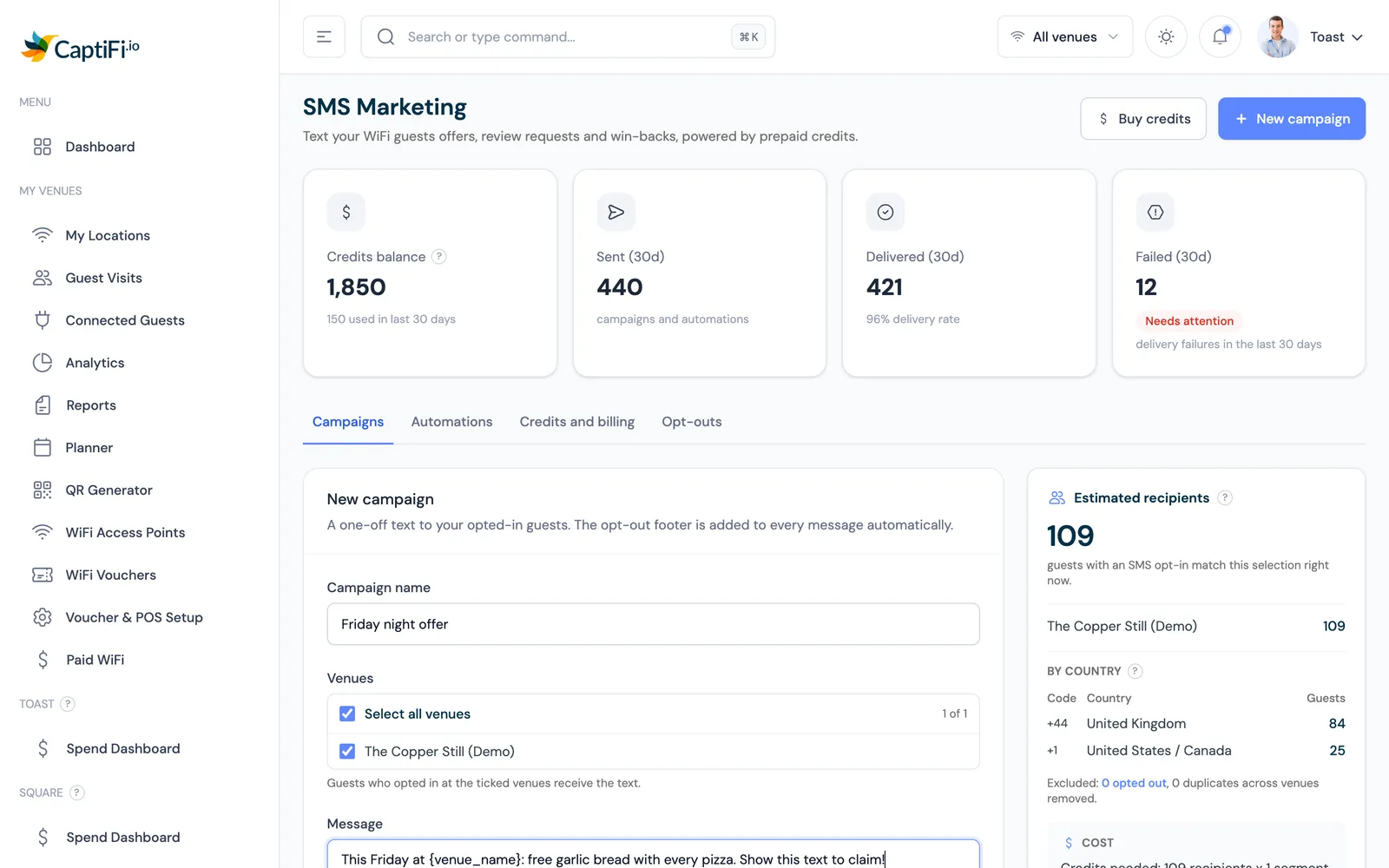
For the text, open Marketing then SMS Marketing in the sidebar. The audience panel beside the composer shows who will receive the campaign: estimated recipients in total and per venue, a by-country breakdown, and the opted-out numbers and duplicates removed. A footer, "Reply STOP to opt out", is added to every marketing text automatically. Send the draft to your own phone first; a test costs the same credits as one real message.
Cost: credits, segments and quiet hours
SMS Marketing runs on prepaid credits: one credit buys one SMS segment to one recipient. A plain-text segment holds up to 160 characters, and a longer message is split into segments of 153. An emoji or special character switches the message to unicode, which cuts a segment to 70 characters (67 when split). The STOP footer counts towards that, and the audience panel shows recipients multiplied by segments as the credits required, next to your balance.
Since the release of 24 September 2026, credit packs cost £60 (GBP) for 500 credits, £220 (GBP) for 2,000 and £1,050 (GBP) for 10,000, with the other five currencies (USD, EUR, CAD, AUD and NZD) priced on the same basis and shown in the dashboard. Pick the currency your subscription is billed in, because Stripe allows one currency per customer. A first text to 1,000 imported contacts, one plain segment each, needs 1,000 credits: two packs of 500, or part of a 2,000 pack.
Marketing texts are not sent overnight: by default quiet hours run from 21:00 to 09:00 in the venue's local time, and anything queued in that window goes out afterwards. SMS Marketing is included on the Growth plan and above with no separate SMS licence; plan prices in your currency are on the pricing page, and the channel is described on the SMS Marketing page.
Email versus SMS under PECR, and what CaptiFi records
The table puts the two channels side by side. The GDPR compliance page explains exports and erasure from a guest's profile, and our guest WiFi GDPR checklist covers lawful basis and privacy notices for the WiFi list.
| Question | Email under PECR | SMS under PECR | What CaptiFi records or does |
|---|---|---|---|
| Can I message an individual on the list? | Their specific consent, or the soft opt-in for your own past customers | The same: PECR treats texts as electronic mail | The opt-in value per row, or your confirmation of permission with who made it and when |
| Does one permission cover both channels? | Consent for email covers email | Consent must be specific to the type of electronic mail, so a text needs its own | A separate "I have permission to text these contacts" tick-box, recorded against the import |
| Can I use a bought or rented list? | The soft opt-in does not apply to bought-in lists | The same | A named person on your account confirms permission before the import runs; the name and time are kept |
| What must every message carry? | Your identity and a valid contact address so people can opt out | The same, in far fewer characters | A one-click unsubscribe on every email; a "Reply STOP to opt out" footer on every text |
| What happens after someone opts out? | Stop marketing to them, keep a suppression record, and do not ask again | The same, with STOP as the usual route | Previous unsubscribes, bounces and complaints stay suppressed on import; STOP numbers stay opted out |
| When can it be sent? | Not addressed in the ICO pages cited | Not addressed in the ICO pages cited | Marketing texts wait out quiet hours, 21:00 to 09:00 venue local time by default |
Sources
The ICO pages quoted are, from the Guide to PECR, Electronic mail marketing, and from the ICO's Direct marketing guidance, Plan direct marketing, Collect information and generate leads and Respect people's preferences. Quotations were checked against the live pages on 29 September 2026; the ICO revises its guidance, so read the current page first. Product behaviour comes from the CaptiFi customer guides Import Existing Contacts and SMS, and from the release notes of 18 and 24 September 2026.
Frequently asked questions
Quick answers to the most common questions about this topic.
Can I import a customer list I bought and email or text it?
Does the soft opt-in let me text the customers on my old booking list?
If a customer agreed to marketing emails, can I text them as well?
What does CaptiFi record when I import a list without an opt-in column?
Will imported contacts inflate my visitor numbers?
How much does it cost to text 1,000 imported contacts?
Can a re-import text someone who replied STOP?
What files and sizes does the CaptiFi contact import accept?
The CaptiFi Editorial Team writes about guest WiFi marketing, captive portals, GDPR-compliant data capture, and local SEO for venue operators. We base our recommendations on real customer outcomes and verified third-party reviews from G2.com.
Ready to turn your guest WiFi into a marketing engine?
CaptiFi captures customer data from every WiFi login, automates Google reviews and email follow-ups, and plugs into the tools you already use. Hardware included (refundable deposit), transparent pricing, 30-day free trial.