Quiet Tuesday: Five WiFi Workflow Recipes for a Slow Pub Night

Every pub has a night that does not pay for itself. The kitchen is staffed as if it were Friday, the room is half full, and the usual answer is a blanket discount posted to everyone, which trains the regulars to wait for it. These five recipes, built on CaptiFi's guest WiFi tools, go only to guests the data says have gone quiet, or who have just proved they will come on the night you want to fill, and go to each of them once. A table at the end compares them.
Why a quiet night is a data problem
A guest profile in CaptiFi already knows more about a Tuesday than a manager does. Once a guest has visited four times and 40 percent of those visits fall in the same weekday and time of day, the profile names their usual slot, for example Fridays, evening.
Above those tiles sit prompts for your team, each written from a stated rule over real data. Regular gone quiet appears for a guest with at least three visits and nothing for 45 days or more; after 90 days it reads Regular not seen for months. Overdue by their own rhythm appears for a guest who usually comes back every week and has not been in for more than twice that.
Those prompts are per guest, useful at the bar and no help for filling a Tuesday. The recipes below turn the same rules into triggers, so the regular who is 45 days overdue is treated differently from the stag party that came once in June.
Recipe 1: the regular who has gone quiet
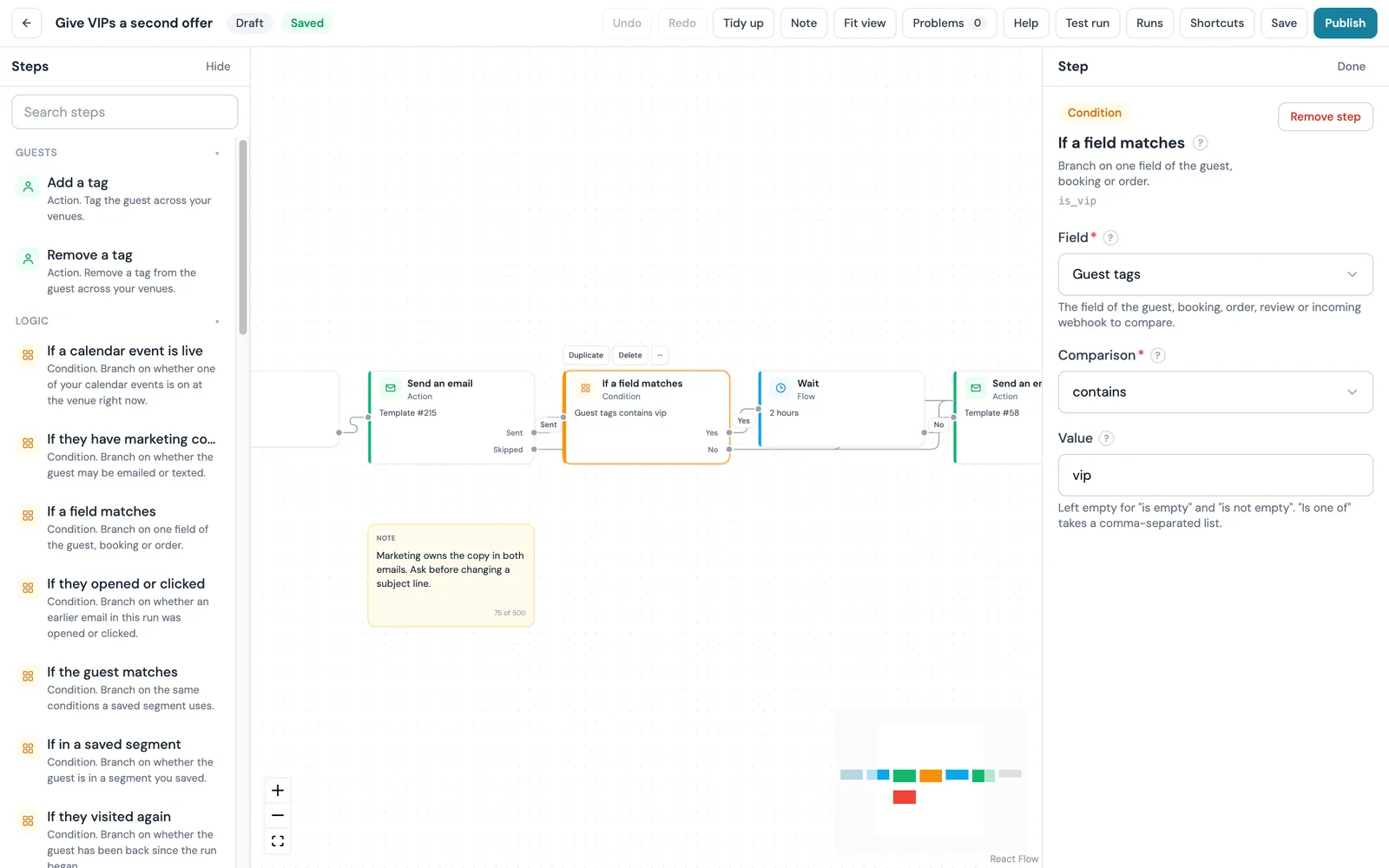
This one is a workflow, because it needs a condition in front of the email. On the Workflows canvas, choose Guest has not visited for a while as the start, set to 45 days to match the profile prompt. Add an If a field matches step on Guest visit count, compared against three, so only guests with three or more visits take the yes path; a first-timer takes the no path and the run ends.
On the yes path, Send an email, then Wait until something happens with returned as the event and a 30-day limit. A guest who signs in again takes the It happened path, is tagged came back, and the run ends. A guest who stays away takes the Timed out path to one text message, which goes only to guests who agreed to texts. Set re-entry to 60 days so nobody is chased twice in a season.
Test run walks one real guest through the draft without sending anything, and Publish pins a numbered version that guests already in a run finish on. Workflows is on the Pro plan and above and on every free trial.
Recipe 2: a quiet-spell trigger
If you do not need the visit count check, a single-trigger automation does the job. Choose Guest has not visited as the trigger and pick the number of days without a connection, from 1 to 365. The email goes out at 10:00 in the venue's local time on the day each guest crosses that mark, so a pub whose regulars come weekly can set 21 days.
An automation carries up to five follow-ups, by email or text, each a chosen number of days after the previous one and each with an Only if rule: always, did not open, did not click, or has not visited again. Set the second message to Only if has not visited again and the sequence stops the moment the guest signs in. The Come back after 60 days preset, with its 14-day follow-up, is this recipe pre-built and switched off until you have read it.
Every automation needs at least one venue chosen before it saves, never sends to an address that has unsubscribed, bounced or complained, and counts towards the monthly email allowance; a send that would pass the allowance is held until it renews. Automations and campaigns are on the Growth plan and above.
Recipe 3: a repeating come-back campaign to a last-visit segment
The first two recipes catch each guest on the day they cross a line. A repeating campaign goes out on a schedule to everyone over the line at that moment. Build a segment with two conditions: Last visit more than 60 days ago, which leaves out anyone who came in last week, and How they joined set to connected to your WiFi, which keeps an imported list out.
Create a campaign to that segment and set it to repeat monthly until a date you choose. Each guest is emailed once unless you say otherwise, so a guest who drifts past 60 days in November hears nothing in December. The wizard shows the sends per run and per month against your allowance, and My Campaigns shows the next run and how many have gone out, with a button to stop repeating.
Recipe 4: quiz night from the calendar
The recipe gallery on my.captifi.io has a Venue operations group, and one of its recipes swaps the splash page for a quiz night. It starts from an event on the venue calendar and puts the default page back when the event ends or after a set number of hours. The splash design is left for you to choose before publishing.
A second recipe in the group shows a message across the splash page, and one of its written uses is the day after a quiz. The wording is on the canvas and you edit it there, so Wednesday's sign-in screen can carry next week's quiz time. One calendar entry gives the quiz a splash page on the night and a message strip the morning after.
The swap is also available without a workflow, from the Planner calendar, through WiFi Automations. There the end time is mandatory, so the default design always returns, and a weekly repeat pins the swap to the venue's local clock through daylight saving changes.
Recipe 5: tag everyone who connects on a Tuesday and email them once
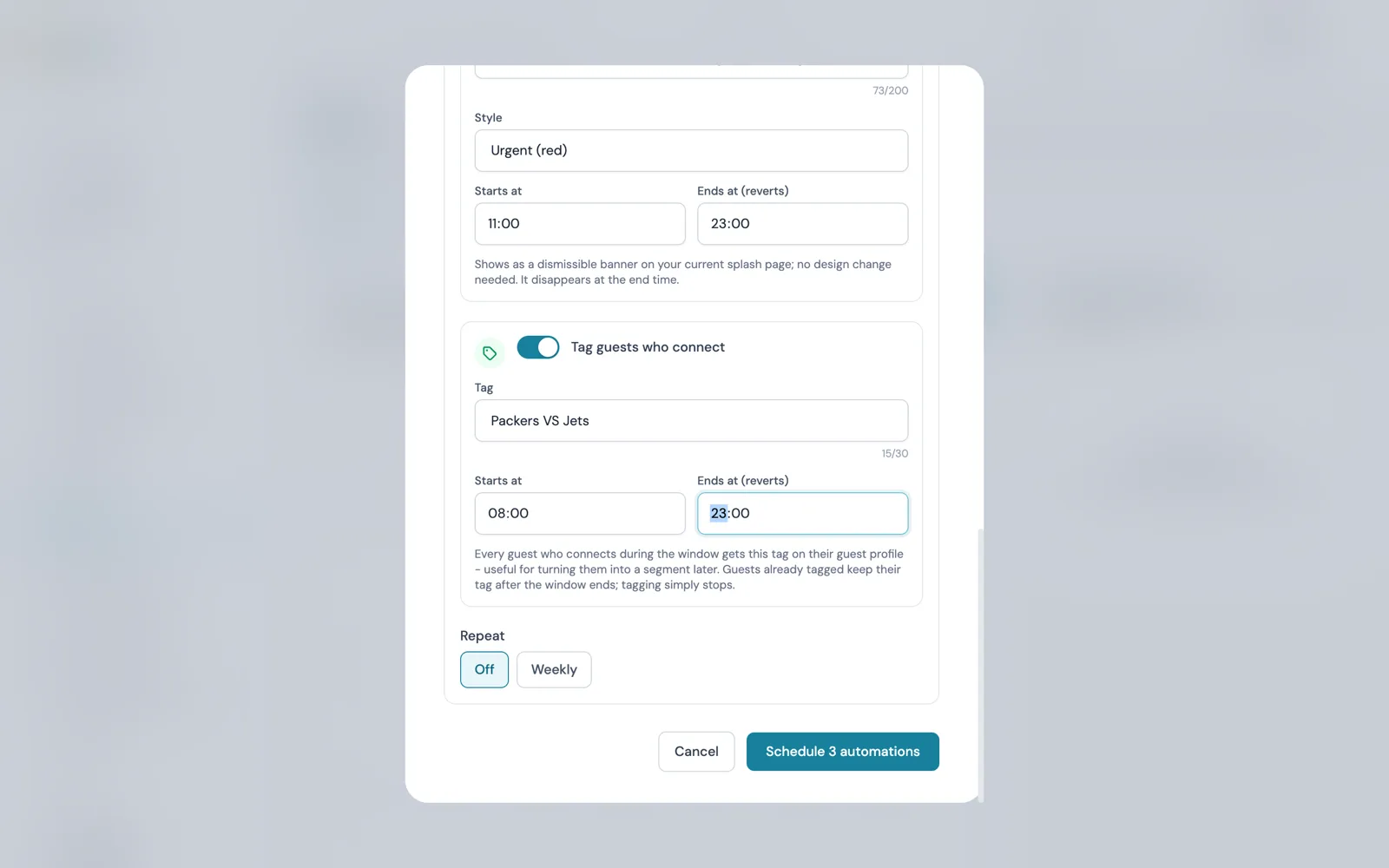
The crowd that does turn up on a quiet Tuesday is the most useful list you have for the next one. The ninth Venue operations recipe was written for match days: it tags guests who connect during the match, then emails them about the match day offer, once. A guest already tagged from an earlier match is left alone. Point it at a Tuesday event on the calendar instead.
The already-tagged check is what stops the regret. Someone who comes every Tuesday gets the email the first week and never again; a Friday regular who tries a Tuesday gets it the first time they do.
The tag outlives the workflow. A Guest tag condition in Audiences turns everyone tagged into a saved segment with a live count, selectable in the email and SMS campaign wizards, and tag matching is exact. The same tagging runs as a WiFi Automation from the Planner: every guest who connects inside the window gets the tag, first visit or fiftieth, and keeps it when the window ends.
What to offer, and the one discount rule
None of the five recipes needs a discount. The one rule for any offer you do attach: it goes out when the data says a guest has stopped coming, or has just proved they will come on a Tuesday, and it goes to that guest once. A blanket offer to the whole list is what makes a discount regrettable, because the Friday regulars redeem it on a night they were coming anyway.
What the offer is matters less than who gets it. A held table for their usual group, or a first look at the new menu, costs the pub little on a half-empty night and lowers no price for the people already at the bar. The Send an email step can carry one of your offers, and the canvas has Give a reward or offer and Attach a WiFi voucher code actions for one redeemed on the night. Write it to expire before the next quiet night.
Measuring it
Every automation has a Results view: guests entered, emailed, opened, clicked, deferred, skipped with the reason, and came back within 30 days, per step, for the last 30, 90 or 365 days or all time. Came back within 30 days is the number a quiet night turns on. If the email is opened and nobody returns, the offer is wrong; if it is not opened, the subject line or the send day is.
Workflows counts every step: guests entered, the output they took, how many are waiting and why any send was skipped. For recipe 1 that is the It happened count against the Timed out count, a return rate in plain numbers.
On the guest profile, the Emails opened tile shows opened of sent, with a percentage from three sends onwards, and the Visits and rhythm card shows sign-ins per month and a weekday-by-time-of-day grid, so a Tuesday that starts filling up shows on the profiles of the people you emailed.
The five recipes side by side
| Recipe | Trigger | Wait | Action | Plan needed |
|---|---|---|---|---|
| 1. Regular gone quiet | Guest has not visited for a while (45 days), then If a field matches on visit count | Until the guest returns, up to 30 days | Email; tag came back on return; one text on time out; re-entry 60 days | Pro and above (Workflows), on every free trial |
| 2. Quiet-spell trigger | Guest has not visited, 1 to 365 days | Sends at 10:00 venue time on the day the mark is crossed | Email, up to five follow-ups by email or text with Only if rules | Growth and above |
| 3. Repeating come-back campaign | Segment: last visit more than 60 days ago, joined via WiFi | Repeats daily, weekly or monthly until a chosen date | Campaign email at each run, each guest once unless you say otherwise | Growth and above |
| 4. Quiz night from the calendar | A venue calendar event begins | Until the event ends or a set number of hours | Swap splash page; message strip the day after | Pro and above (Workflows); the swap alone is also a Planner WiFi Automation |
| 5. Tuesday tag, email once | A guest connects during the calendar event | None | Add a tag; email once; already tagged left alone | Pro and above (Workflows); tagging alone is also a Planner WiFi Automation |
All five recipes run from one guest list captured at WiFi sign-in. The pubs page and the pub WiFi marketing guide cover the capture side these recipes depend on. Workflows is on Pro and above and on every 30-day free trial; automations and campaigns start on Growth, with prices on the pricing page in your currency.
Sources: CaptiFi release notes of 14 September 2026 (lapsed-guest automations, recurring campaigns, the Last visit and How they joined segment conditions, allowance and suppression) and 25 September 2026 (the Venue operations recipes); the Guest Profile customer guide at docs.captifi.io/dashboard/guest-profile for the team prompts; and the Workflows, Automated Marketing and WiFi Automations feature pages on this site for step names and plan levels, as published on 29 September 2026. No return rates or revenue figures are quoted because none are published.
Frequently asked questions
Quick answers to the most common questions about this topic.
What are the best quiet night pub promotions without a blanket discount?
When does the lapsed-guest automation send its email?
What counts as a regular who has gone quiet in CaptiFi?
Can a repeating come-back campaign email the same guest twice?
Which CaptiFi plan do the five recipes need?
Do automation emails count towards my monthly email allowance?
Does the quiz night splash page go back to normal on its own?
How do I tag everyone who connects on a Tuesday and email them once?
The CaptiFi Editorial Team writes about guest WiFi marketing, captive portals, GDPR-compliant data capture, and local SEO for venue operators. We base our recommendations on real customer outcomes and verified third-party reviews from G2.com.
Ready to turn your guest WiFi into a marketing engine?
CaptiFi captures customer data from every WiFi login, automates Google reviews and email follow-ups, and plugs into the tools you already use. Hardware included (refundable deposit), transparent pricing, 30-day free trial.