Autumn and Winter 2026 Hospitality Marketing Calendar

The trading year for a pub or restaurant tilts hard towards its last quarter. Between the end of October and the first week of January, Halloween, Bonfire Night, the Black Friday weekend, the December party run and New Year's Eve each fill the room on their own. Each puts a full house on your guest WiFi in one evening, and each is over before anyone has written down who came.
This calendar treats every one of those dates as a capture moment. You schedule what the WiFi does in advance, the splash page collects the crowd, and the follow-up goes out on a day you chose weeks earlier. Halloween falls on a Saturday in 2026 and Bonfire Night on a Thursday, which shapes what each night can sell.
The calendar at a glance
| Date | Weekday | Capture moment | Follow-up |
|---|---|---|---|
| 31 October | Saturday | Halloween splash design live, every connecting guest tagged | Email the tagged crowd about Bonfire Night and opening Christmas bookings |
| 5 November | Thursday | Bonfire Night message strip with display timings, guests tagged | Weekend offer to the tag on the Friday |
| 27 and 30 November | Friday and Monday | Black Friday campaign to the whole opted-in list: gift vouchers and New Year's Eve tickets, with a Cyber Monday last call | Last-tables reminder in early December |
| 1 to 24 December | Party nights | Christmas design live, party-night guests tagged on a weekly repeat | Thank-you and review request, then the January come-back email |
| 25 December | Friday | Christmas Day: bank holiday splash and message from the Workflows recipe, where you open | New Year's Eve tickets still on sale |
| 31 December | Thursday | New Year's Eve: ticketed entry, door check-in from a phone, New Year splash design | Buyers and connectors into the January campaign |
| January | Weekly | Recurring come-back campaign to guests not seen for 30 days | Valentine's pre-booking |
October: Halloween on a Saturday
Halloween lands on Saturday 31 October in 2026, so the fancy dress crowd and the normal Saturday crowd arrive together. That is the night to have the Halloween splash design live. CaptiFi ships a Halloween template alongside Christmas, Match Day, Valentine's and New Year; create a design from it and your venue's logo, background image and name are carried over from your default design, so it looks like yours before you open the builder.
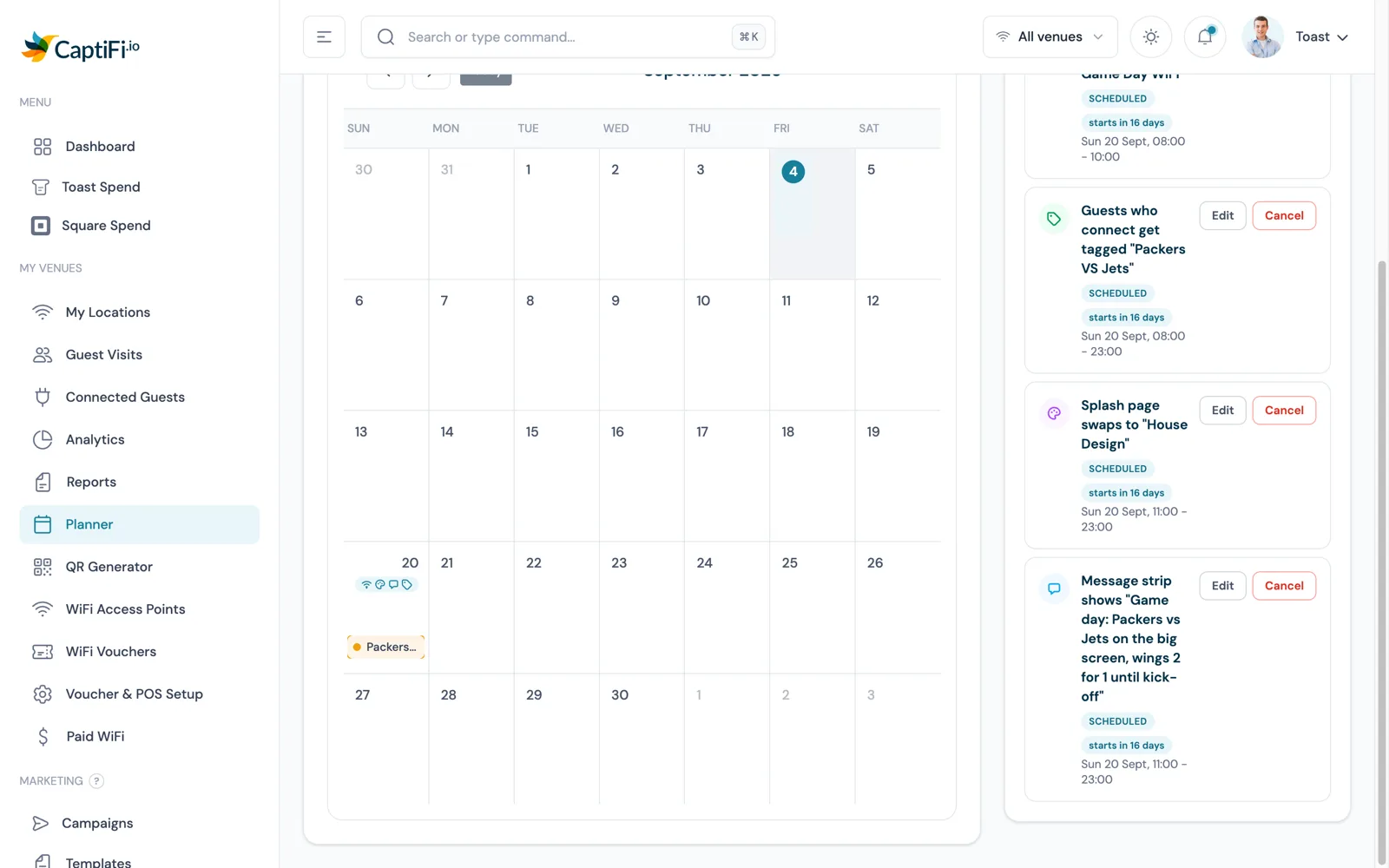
In the Planner, plan the event on the 31st, pick the venue and switch on Swap splash page with the Halloween design and a window from opening to close. Switch on Tag guests who connect for the same window with a tag such as "Halloween 2026". Every guest who connects inside that window gets the tag on their profile, first visit or fiftieth, and keeps it after the window ends.
A WiFi name change for the night is possible on a CaptiFi device or a linked UniFi controller, and it belongs before the doors open: renaming disconnects every device, and phones do not rejoin a network with a new name on their own.
The follow-up is where the tag pays. A segment with the condition Guest tag contains "Halloween 2026" becomes a saved audience with a live count, selectable in the campaign wizard for email and SMS. Email it in the first week of November about Bonfire Night and Christmas bookings. All four automations are on the WiFi Automations page.
5 November: Bonfire Night on a Thursday
Bonfire Night is Thursday 5 November, so the trade splits between the night itself and the nearest weekend. If your venue runs or sits beside a display, the useful thing to tell guests is timing: when the fireworks start and when food stops. A message strip does that with no design work. It is a banner of up to 200 characters on top of whatever splash design is live, in one of four styles, with a start and end time, and it disappears for everyone when the window ends.
Tag the night too. "Bonfire Night 2026" on every connecting guest is a list of people who came out on a cold Thursday, and a good list to email on the Friday about the weekend. If your display moves to Saturday 7 November, edit the Planner event before it starts; everything stays editable up to the start time. On the morning of any day with scheduled automations the account owner gets an email at 8am venue time listing what will run.
Black Friday for venues: 27 to 30 November
Black Friday is Friday 27 November and Cyber Monday is Monday 30 November. Retailers use the weekend to discount stock. A venue should use it to sell gift vouchers and New Year's Eve tickets for December and January trade, and leave the price of the Friday night alone. Discounting a Friday that would have been busy anyway gives margin away, while a voucher sold that weekend is a table in February, when you need it.
Schedule an email campaign to your whole opted-in list for the morning of the 27th with your gift voucher offer and a link to the events page where New Year's Eve tickets are already on sale, then a Cyber Monday campaign as the last call; both can be queued in October.
The Campaign Calendar under Email Marketing shows every scheduled, sending and sent campaign on the day it goes out, each run of a repeating campaign, SMS campaigns on accounts with SMS marketing, and your Planner events alongside them. You can filter the month by venue and move a scheduled one-off send to another day and time, and drafts with no send date sit beside the grid so a half-written Cyber Monday email is not forgotten.
December: party bookers and the Christmas splash in one afternoon
December is covered in depth in our Christmas pub and restaurant WiFi marketing guide: the festive campaign calendar, gift voucher timing, the review push and the dry January plan. This section is only about the WiFi side, done in one sitting.
Start in the design library. Create a design from the Christmas template; your logo, background image and venue name come across, and it lands in the library to be edited like any other. Then either activate it for the month or schedule it: a Planner swap applies the design at the start time and restores your venue's default design at the end time.
Swaps revert to the design marked as your venue's default, so if the Christmas design should come back after a scheduled New Year's Eve swap ends, set it as the default for the month.
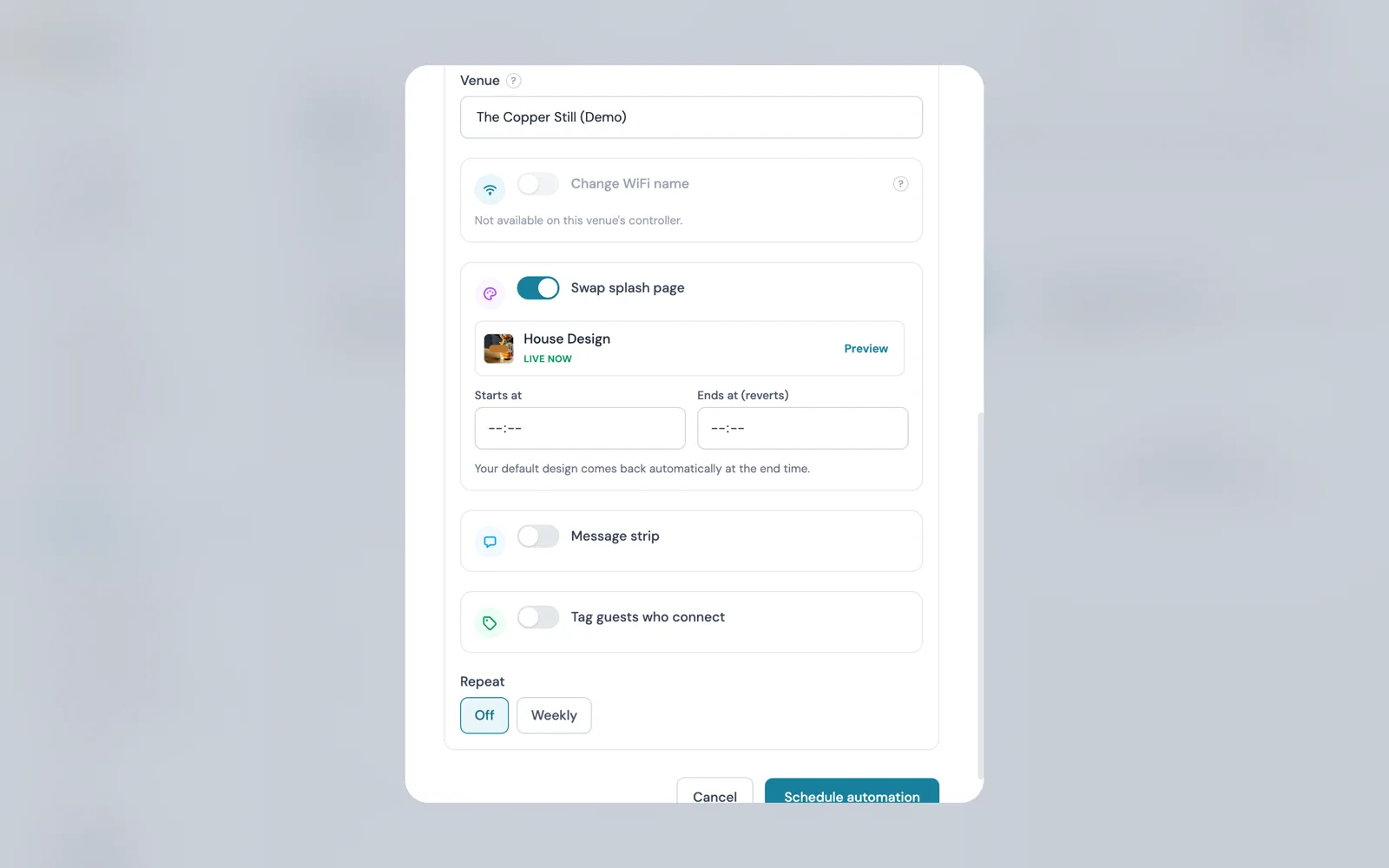
Party nights are the tagging opportunity in December. Office parties book through one organiser, and the rest of the table have never given you their details. Plan an event for the party nights and switch on Tag guests who connect with a tag such as "Christmas party 2026".
For a run of Fridays and Saturdays, set Repeat to Weekly, tick the days and set Repeat until 24 December; each week is its own entry in the Scheduled automations list, so one can be cancelled without touching the series. The late December thank-you and the mid January come-back email then go to that segment.
Bank holiday weekends: the Workflows recipe
Workflows, on the Pro plan and above, adds a recipe that handles bank holidays without a date being typed anywhere. The Bank holiday weekend recipe shows your holiday splash design and a message strip from 10:00 two days before a bank holiday in the venue's region, and keeps them up to the end of the holiday. You pick the region from a list when you choose the recipe and the splash design before publishing; the message wording is written for you and can be edited on the canvas.
Today it works for England and Wales, Scotland and Northern Ireland, so the bank holidays over Christmas and New Year are handled in those regions. The United States region is offered once its holidays provider is connected. The fixtures and weather recipes in the same group show as not available until CaptiFi has connected a fixtures or forecast provider, and open the day one is connected with nothing to change on your side. The Workflows page lists all 35 recipes.
New Year's Eve: tickets and door check-in
New Year's Eve is Thursday 31 December, and it is the ticketed night in this calendar. With Events switched on (Growth plan and above), every venue gets a public events page listing what is on sale, with a From price, Free or Sold out on each event. Create the event with its start time in the venue's timezone, add up to 12 ticket types, each with its own quantity, per-order limit and sales window, and publish. Put it on sale before Black Friday so the November campaign has something to link to.
Guests pick their tickets, give their details and pay by card, Apple Pay or Google Pay. Tickets are held for ten minutes from the moment they are picked and released if the buyer walks away, so nobody can park stock. A paid order charges your venue's own Stripe account, with CaptiFi's booking fee taken on the charge: shown to the buyer as a separate line when you pass it on, absorbed when you do not. Free tickets and RSVPs skip payment and carry no fee.
The booking fee steps down as the ticket price rises, from 7.5% in the lowest price band to 4.5% in the top band, with card processing included. The minimum fee on a paid ticket is 50p in GBP (75c in USD, CAD, AUD and NZD, 60c in EUR), and the lowest price a paid ticket can be set at is the same figure.
Every buyer gets a confirmation email with one QR code per ticket. On the night, door staff open Door check-in on a phone, pick the event and scan the code or type the ticket number; each ticket admits once, and a mistaken admit can be undone for five minutes. Buyers also land in your guest list tagged "ticket buyer", with marketing consent recorded only when they ticked the box. Schedule the New Year template as a splash swap for the 31st; the fee bands and Stripe setup are on the Events and Ticketing page.
January: the recurring come-back campaign
Everything above builds a list; January is when it gets used. The first tool is a recurring campaign: a campaign can repeat daily, weekly or monthly until a date you choose, emailing each guest only once unless you say otherwise. Point it at a segment whose Last visit condition is more than 30 days ago, and a "come back and see us" email reaches each December guest on the first run after they cross that mark, without also reaching guests who came back last week.
The second is the lapsed guest automation, triggered when a guest has not visited for a chosen number of days, from one day to a year, and sent at 10:00 in the venue's local time on the day each guest crosses that mark. Automation emails count towards your monthly email allowance like campaign emails, and they are never sent to an address that has unsubscribed, bounced or complained.
Segments can also separate guests who connected to your WiFi from contacts you imported from a list. With the tags from October, November and December, January's sends can be specific: the Halloween crowd hears about the next fancy dress night and the New Year's Eve buyers about the next ticketed event. The next fixed date after that is Valentine's Day, covered in Valentine's Day restaurant marketing with guest WiFi.
What to schedule now: a Planner checklist
- Create designs from the Halloween, Christmas and New Year templates in each venue's design library and open each in Preview. Only the designs you create count toward your design limit.
- Plan Halloween (31 October) and Bonfire Night (5 November) in the Planner with Swap splash page and Tag guests who connect switched on, windows set to opening hours.
- Add a message strip to Bonfire Night with display timings, under 200 characters.
- Switch Events on, connect Stripe, and publish the New Year's Eve event so tickets are on sale before 27 November.
- Schedule the Black Friday campaign for 27 November and the Cyber Monday campaign for 30 November, then check both on the Campaign Calendar.
- Activate or schedule the Christmas design for December, and schedule the "Christmas party 2026" tag with a weekly repeat until 24 December.
- On Pro, choose the Bank holiday weekend recipe, pick your region and holiday design, and publish it.
- Build the January come-back campaign now: a segment on Last visit more than 30 days ago, and a campaign repeating weekly through January.
Scheduling automations needs the Manage splash pages permission; automations belong to the venue, so every team member with access sees them on the calendar. The pubs page and the restaurants page cover the rest of the setup, and the splash page builder is where every design in this calendar is edited.
Sources: the CaptiFi Planner and WiFi Automations guide and the Splash Page Builder guide (seasonal templates) on docs.captifi.io; CaptiFi release notes of 14 September 2026 (Campaign Calendar, recurring campaigns, lapsed guest automations, Last visit segments), 18 September 2026 (ticket checkout), 24 September 2026 (booking fee minimums) and 25 and 28 September 2026 (bank holiday, fixture and weather recipes); the CaptiFi WiFi Automations, Events and Ticketing, Workflows and Branded Splash Pages feature pages. Plan prices are on the pricing page in your currency. Correct at the time of writing, September 2026.
Frequently asked questions
Quick answers to the most common questions about this topic.
When is Halloween in 2026, and what should a pub do on guest WiFi?
When is Bonfire Night in 2026?
When are Black Friday and Cyber Monday in 2026, and how should a venue use them?
Can I schedule a Christmas splash page in advance?
What does it cost to sell New Year's Eve tickets through CaptiFi?
How do I email the guests who came in on Halloween or a party night?
Do the bank holiday, fixture and weather workflow recipes work in my region?
What is a recurring come-back campaign?
The CaptiFi Editorial Team writes about guest WiFi marketing, captive portals, GDPR-compliant data capture, and local SEO for venue operators. We base our recommendations on real customer outcomes and verified third-party reviews from G2.com.
Ready to turn your guest WiFi into a marketing engine?
CaptiFi captures customer data from every WiFi login, automates Google reviews and email follow-ups, and plugs into the tools you already use. Hardware included (refundable deposit), transparent pricing, 30-day free trial.