Selling faster WiFi: paid speed tiers for hotels and coworking

A hotel lobby or a coworking floor has guests with different needs on the same network. The person checking email wants it free and quick; the person on a two-hour video call would pay for a connection that does not stutter. With CaptiFi Paid WiFi, each pass on your splash page can carry its own download and upload speed alongside its duration and data allowance, so the fee buys a measurably faster connection.
Free for everyone, faster for a fee
Your venue-wide guest bandwidth limit, set under My Locations, Edit site, becomes your free tier. A paid pass overrides that limit for the guest who bought it, for as long as the pass lasts.
The override happens the moment the payment completes, and the pass button on the splash page shows the tier before they buy, in the form "24 hours of access · 100/20 Mbps". The passes live on the Paid WiFi page on my.captifi.io, where everything is set per venue; the Paid WiFi feature page holds the full specification.
Designing three tiers: venue-wide limit, standard, premium
The CaptiFi guide describes a typical setup with three levels: free or entry guests on the venue-wide limit, for example 5 Mbps down and 1 Mbps up; a Standard pass at 20 Mbps down and 5 Mbps up; and a Premium pass at 100 Mbps down and 20 Mbps up.
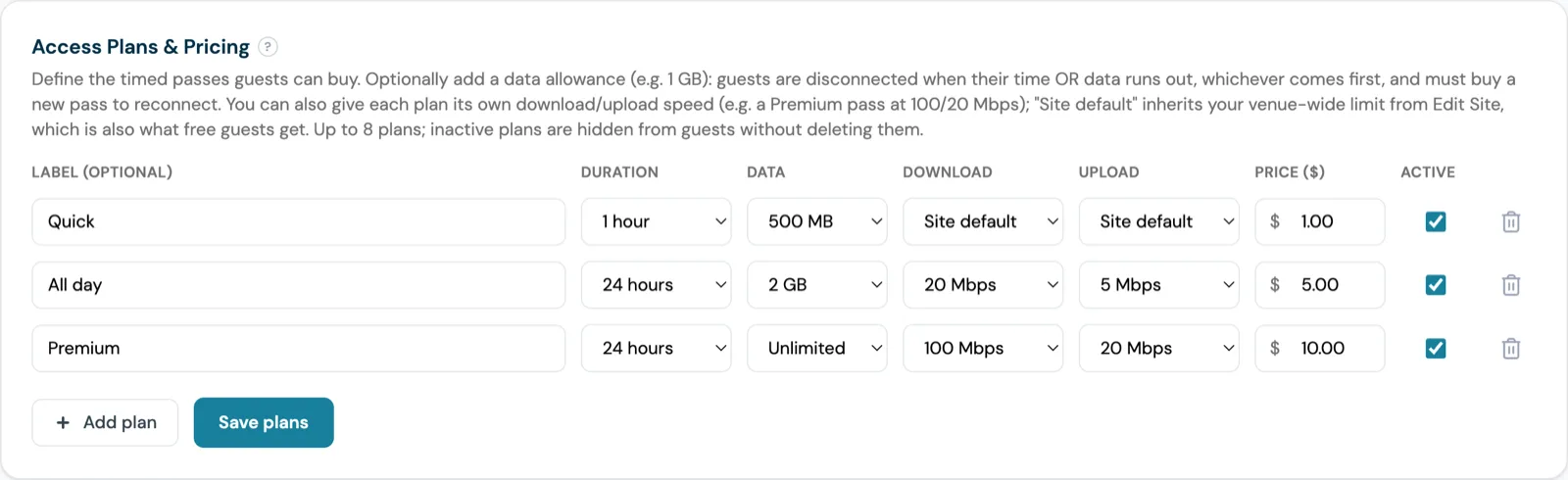
Each pass has its own Download speed and Upload speed in the Access Plans & Pricing card, from 1 Mbps to 500 Mbps. The two are set separately. Leaving a pass on Site default means it inherits the venue-wide limit, and if the venue has no limit a Site default pass is unrestricted.
Sell a Premium pass at 100/20 Mbps with the venue-wide limit blank and your free guests are unrestricted while the paying guest is capped below them, so set the venue-wide limit first. A venue holds up to eight passes, and an inactive pass is hidden from guests without being deleted.
Pricing a pass: duration, data and speed together
A pass has more dials than speed: a duration between 30 minutes and 7 days, an optional data allowance from 100 MB to 10 GB or unlimited, download and upload speeds, an optional label such as All Day, and a price in your Stripe currency. The dials combine freely, so one pass can be faster, longer and larger at once, and another short and cheap.
Duration follows how long the guest stays, data how much they move (the guide's example pairs 24 hours with 1 GB), and speed how quickly they need it, the dial only the premium guest notices.
You set your own prices per venue, in your own currency. As a starting point the guide's example suggests around £1 (GBP) for an hour and £3 to £10 for a day pass, set in your own Stripe currency, with airports, events and conference spaces able to charge more. A pass with a data allowance ends when the time or the data runs out, whichever comes first, and is not refunded automatically when the data goes first, so on a short pass keep the allowance generous or leave it unlimited.
The UniFi caveat, and what other hardware does
Speed tiers are enforced on UniFi, through a controller login or a local API key. On every other platform the tier is saved with the pass and shown on the button, but the network does not apply it yet, so a guest who paid for 100/20 Mbps at an Omada or Meraki venue gets the venue's normal speed. The guide is explicit: only sell speed tiers if your venue runs on UniFi. Elsewhere, sell passes by duration and data and leave every pass on Site default.
Data allowances have a wider footprint. Enforcement is strongest on UniFi, CaptiFi devices and the RADIUS platforms Cisco, Aruba and Ruckus; it is best effort on TP-Link Omada and cannot be enforced on Cisco Meraki click-through. Usage is read from the controller's traffic counters and enforced within a few minutes.
| Platform | Speed tier on a pass | Data allowance on a pass |
|---|---|---|
| UniFi (controller login or local API key) | Enforced | Enforced, natively by the controller as well |
| CaptiFi device | Shown to the guest, not applied | Enforced |
| Cisco, Aruba, Ruckus (RADIUS) | Shown to the guest, not applied | Enforced |
| TP-Link Omada | Shown to the guest, not applied | Best effort |
| Cisco Meraki click-through | Shown to the guest, not applied | Cannot be enforced |
A free taster before the paywall
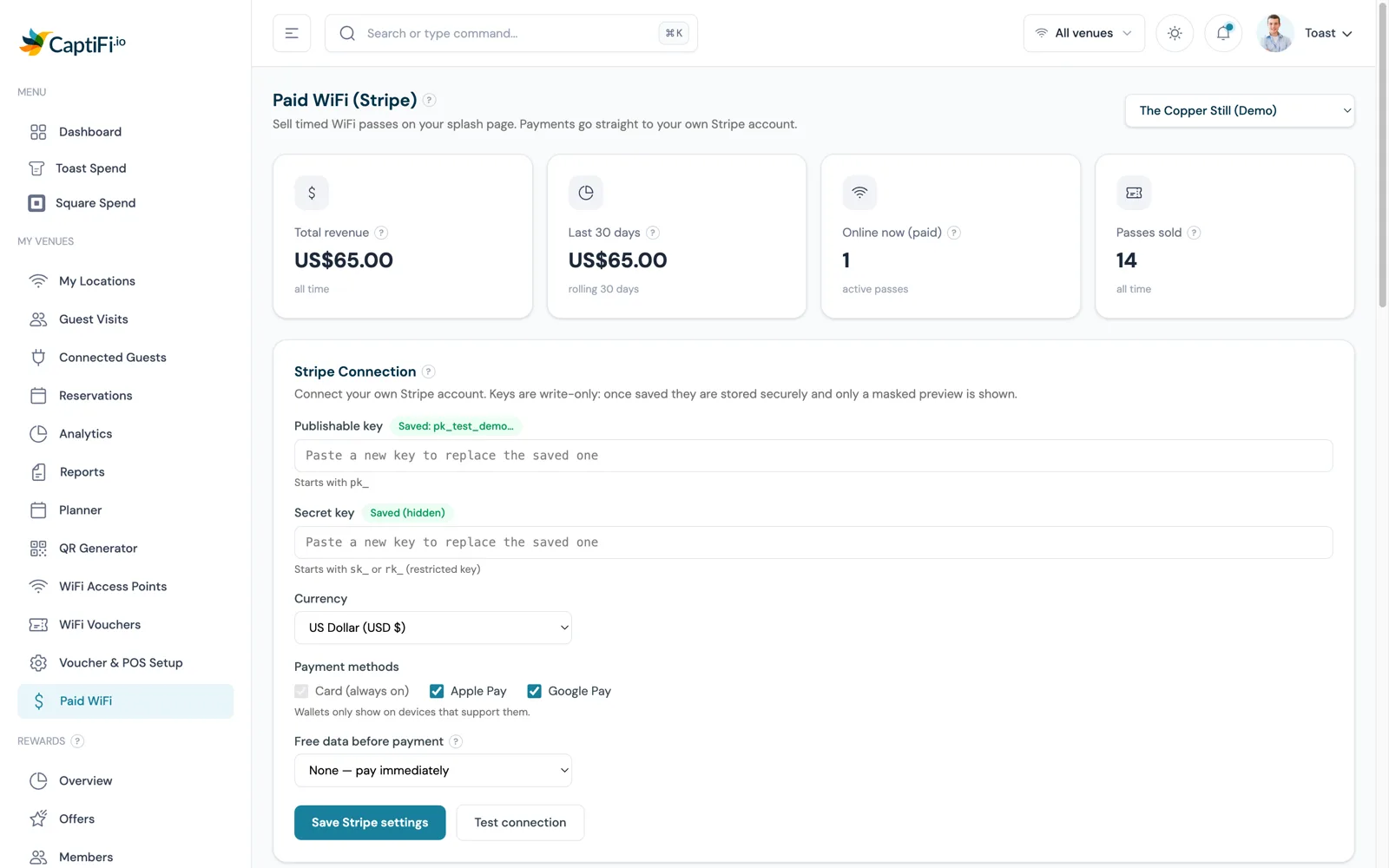
Free data before payment gives every device an allowance between 50 MB and 1 GB before it sees the paywall. Set it in the Stripe Connection card, where the default is None, pay immediately.
With it on, a guest sees a green Free WiFi button above the passes, with a line such as "250 MB of free data, buy a pass when it runs out". They tap it and are online at once, with no card or form. When the allowance is used up they are disconnected, and on their next join only the passes show.
Each device gets one free session per 24 hours, tracked by its hardware (MAC) address, and the session ends after 24 hours even if the data is not used. A device that hides its hardware address goes straight to the payment page. Free sessions never count towards revenue. At a tiered venue the taster runs at the venue-wide limit, so the guest feels the free speed before they see the pass that offers more.
Two ladders: coworking spaces and hotels
Coworking: day passes and the per-device free session
A coworking day pass maps onto a 24-hour pass: a label such as All day, a data allowance sized for a working day or left unlimited, and the Standard speed, with a Premium pass beside it at the same duration for the visitor on video calls all afternoon. The coworking page covers how the same splash page captures visitor emails for membership offers.
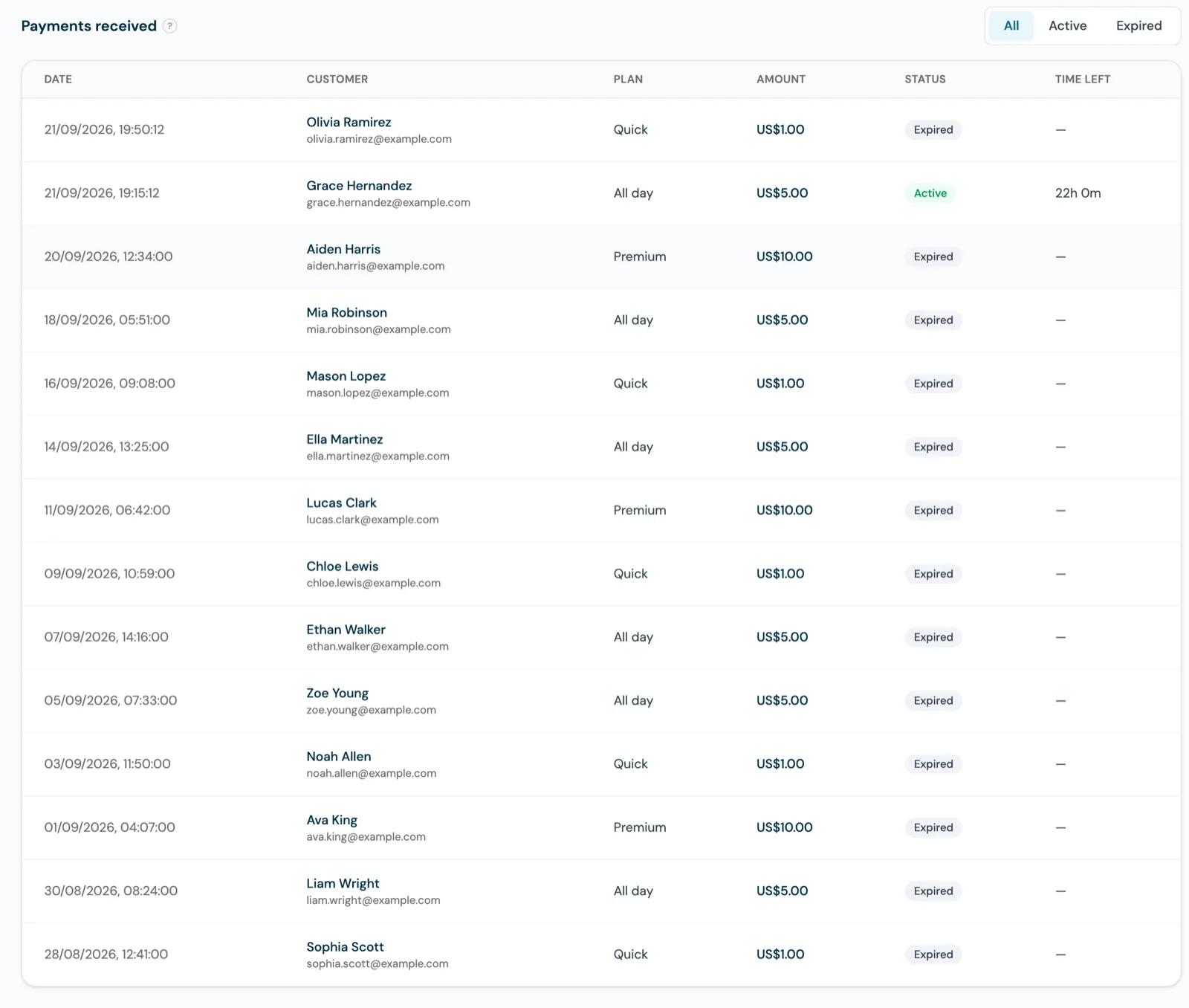
The free session rule is per device, so a visitor's laptop and phone each get their own allowance. The guide describes no per-pass device cap beyond that rule, so set the free allowance small enough (50 MB is the floor) that a full working day needs a pass. The Online now (paid) card shows live paid sessions, and Payments received lists each guest's time left and data used.
Hotels: a free allowance on the venue limit, streaming on a paid tier
For a hotel the ladder reads as basic for everyone and fast for streaming. In Paid WiFi mode the free route is the data allowance: every device gets up to 1 GB a day at the venue-wide speed, then sees the passes. A Premium pass at 100/20 Mbps with unlimited data and a duration of up to 7 days covers a whole stay; the hotels page and our hotel WiFi marketing guide cover what happens to the guest list afterwards.
WiFi Access Mode has two settings per venue, Standard Splash and Paid WiFi, and they are mutually exclusive. A hotel that wants uncapped free WiFi in the room rate and a paid faster tier on the same network does not have that exact shape today: in paid mode the free path is the taster, capped at 1 GB per device per 24 hours. A guest who buys a pass still lands in your guest database, with the name and email taken from the Stripe payment.
Reading revenue in more than one currency
The Paid WiFi page opens on four KPI cards: Total revenue, Last 30 days, Online now (paid) and Passes sold, shown in one currency at a time. If your venues have taken payments in more than one currency, for example across venues that sell in different currencies, the cards show your main currency and a note underneath lists what was taken in each of the others. Amounts in different currencies are never added together.
That matters for a group with a property in London and one in Lisbon, because a combined figure would need an invented exchange rate. Each venue's Stripe currency is set in its Stripe Connection card, and refunds are made from your Stripe dashboard as normal; a refund does not yet end an active session automatically.
French and Spanish guests on the paid page
The paid page can appear in English, French or Spanish. Pick the languages under Guest languages when editing the venue in My Locations, and choose a default for guests whose phone is set to something else. Guests are detected from their phone's language setting; with more than one language offered, a row of buttons appears above the passes, and the choice is remembered on that device for a year.
Everything CaptiFi writes is translated: pass names, prices, the free data message, the payment screen, the card form and the confirmation, and the language survives the payment step, including bank verification screens. Your own wording, your terms and your privacy text stay as you wrote them, and receipts and emails are still sent in English. A venue that only wants English leaves the setting alone.
Free only, vouchers, paid passes, paid with tiers
| Model | How a guest gets online | What comes back to you | Speed control | Revenue from the WiFi |
|---|---|---|---|---|
| Free splash (Standard Splash mode) | Signs in on your splash page | Email and marketing opt-in from the form | One venue-wide limit for everyone | None |
| Vouchers | Enters an eight-character code, generated in the dashboard or printed on the receipt by the till | WiFi kept for paying customers; duration per batch, per-code revoke | One venue-wide limit for everyone | None from the WiFi; the sale is at the till |
| Paid passes | Picks a pass and pays by card, Apple Pay or Google Pay | Name and email from the Stripe payment, into the guest database | Site default passes inherit the venue-wide limit | The pass price, into your own Stripe account, no CaptiFi commission |
| Paid passes with speed tiers | The same, with the speed shown on each button | The same | Per-pass download and upload, 1 to 500 Mbps, applied at payment, enforced on UniFi | The same, with a higher price on the faster tier |
A voucher keeps the WiFi for customers who bought something else; a pass makes the WiFi itself the thing they buy. Free or voucher access is one setting per venue and paid passes are their own mode, so a venue runs one of the three at a time. The WiFi Vouchers feature page covers the code and till side.
To go live at a UniFi venue: set the venue-wide limit, paste your Stripe keys and run Test connection, build the passes, check the preview URL, then switch WiFi Access Mode to Paid WiFi. CaptiFi plans and what each includes are on the pricing page, in your currency.
Sources: the CaptiFi Paid WiFi customer guide at docs.captifi.io/dashboard/paid-wifi (speed tiers, data allowances, the free taster, guest languages, revenue by currency); the August 2026 What's New entries on per-plan speed tiers and on revenue shown one currency at a time; and the CaptiFi Paid WiFi and WiFi Vouchers feature pages. Enforcement notes are as documented in September 2026.
Frequently asked questions
Quick answers to the most common questions about this topic.
Which access points enforce paid WiFi speed tiers?
How do free guests and paying guests get different speeds on the same WiFi?
What speeds does CaptiFi suggest for a three-tier paid WiFi setup?
Can guests try the WiFi before paying for a pass?
Does CaptiFi take a commission on paid WiFi passes?
How does the dashboard show revenue when venues take payments in different currencies?
Which languages can the paid WiFi page appear in?
What is the difference between WiFi vouchers and paid WiFi passes?
The CaptiFi Editorial Team writes about guest WiFi marketing, captive portals, GDPR-compliant data capture, and local SEO for venue operators. We base our recommendations on real customer outcomes and verified third-party reviews from G2.com.
Ready to turn your guest WiFi into a marketing engine?
CaptiFi captures customer data from every WiFi login, automates Google reviews and email follow-ups, and plugs into the tools you already use. Hardware included (refundable deposit), transparent pricing, 30-day free trial.