
Point of Sale integration
Toast POS + CaptiFi
Link captive-portal guests to their Toast order history and spend data.
Link captive-portal guests to their Toast order history and spend data.
The Toast POS integration is the native point of sale connector in CaptiFi. It matches a guest's WiFi login to their Toast orders, joining the consented contact data captured on your splash page (email, name, venue and visit date) to what that guest has actually spent with you. Access is read-only: CaptiFi pulls orders from Toast every 15 minutes and never pushes anything back.
Matched orders feed a Toast Spend dashboard showing matched spend, match rate, average spend per guest, your top spenders and a 12-week trend. Every matched guest gets a tier by total spend in your venue's currency: VIP at 200 or more, Regular at 50 or more, Casual below that. The spend also appears on each guest's profile next to their visit history.
The win-back flow takes one click. The dashboard lists your lapsed high spenders, the guests above a spend level who have not been in recently. Save that list as a segment snapshot and send it a campaign, or export the matched guests and their spend as a CSV. Available on the Growth plan and above.
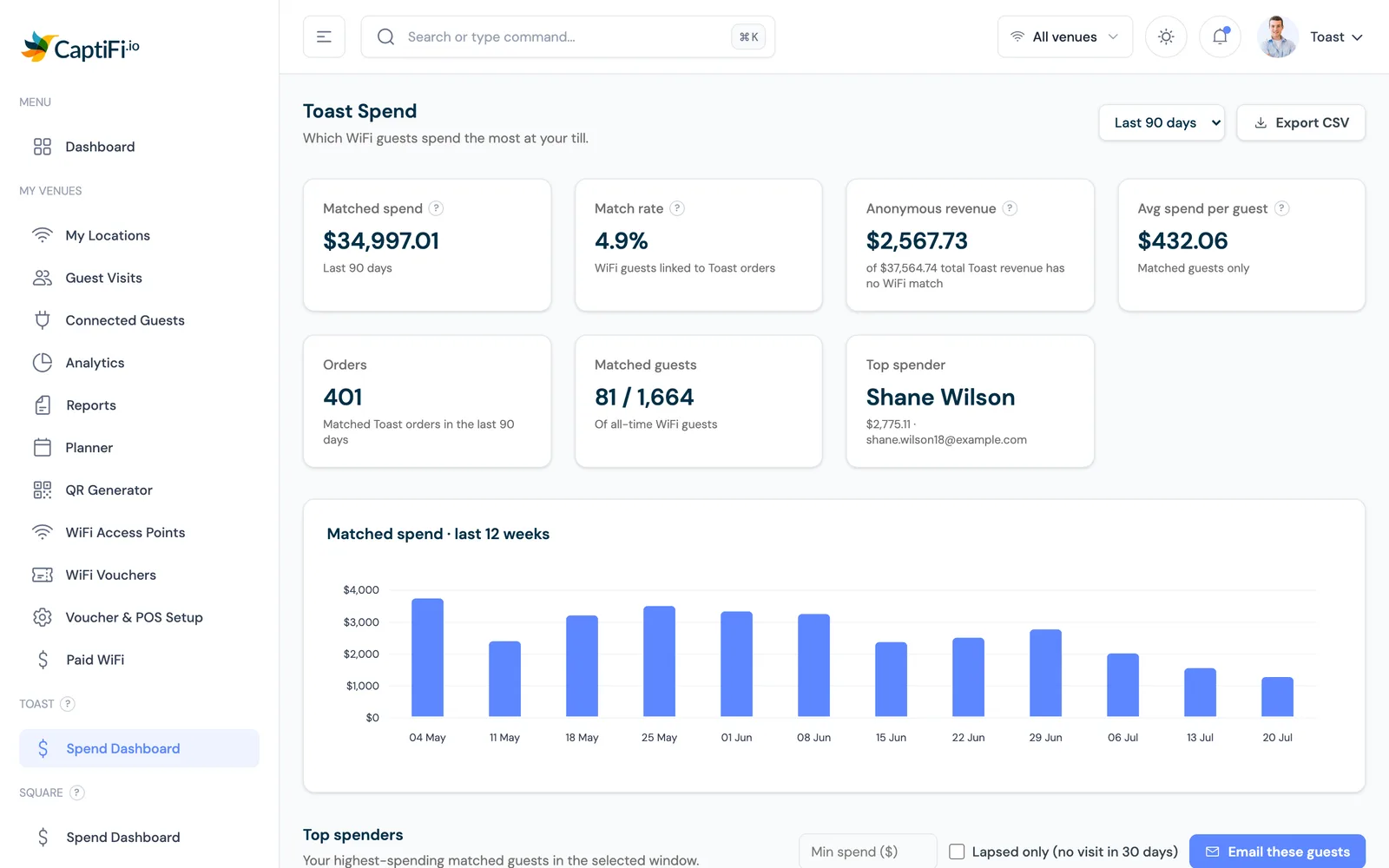
The Toast Spend dashboard turns a flat list of email addresses into matched spend, match rate, average spend per guest and a ranked list of top spenders, filtered to the window you choose.
Every matched guest is tiered VIP, Regular or Casual by their total spend with you, and the figure sits on their guest profile beside their visit history, so staff can see who a returning name is.
One click lists the guests who used to spend well and have stopped coming in. Save them as a segment snapshot and email that group a campaign without building the list by hand.
Orders refresh from Toast every 15 minutes with read-only access, so the dashboard stays close to the floor, and a CSV export is there when you want the matched guests and spend in a spreadsheet.
Enter the machine-client credentials Toast issued for your restaurant, the client ID, client secret and restaurant GUID, into CaptiFi, one set per restaurant location.
CaptiFi matches the email on each Toast order to the email the guest entered on the splash page at WiFi sign-in. Matching is by email only; orders with no email, or a different one, stay unmatched.
Orders refresh every 15 minutes. The dashboard shows matched spend, match rate, average spend per guest, your top spenders and a 12-week trend, with each guest tiered VIP, Regular or Casual.
Open the lapsed high spender list in one click, save it as a segment snapshot and send that group a campaign. Export the matched guests and spend as a CSV whenever you need it.
Step by step, with screenshots.
A casual dining restaurant opens its lapsed high spender list, saves the snapshot as a segment and emails those diners a reason to come back, turning the people who already spent most into return bookings.
A gastropub watches its match rate on the Toast Spend dashboard and, when it drops, reminds staff to take a customer email at the till so more orders link back to WiFi guests.
A multi-site group connects one set of Toast credentials per restaurant, switches between venues on the dashboard and exports the matched spend as a CSV for its own reporting.
30-day free trial. Cancel anytime.